
Model and Measure Part One: Hip Rafters Demystified by Visualizing in SketchUp
In this video, carpenter Matt Jackson uses 3D modeling software to show how hip-roof framing goes together and to measure all the necessary rafters.
A Novel Approach:
There are plenty of textbooks that cover the topic of hip rafter geometry and are the typical material for teaching the subject. Many (most?) carpenters learned roof framing from such textbooks which use static drawings, photos and images. With features available at the Digital Job Site we can take advantage of current technologies for a novel approach to learning the geometry involved for layout and assembly of hip rafter systems. Using the Orbit, Pan and Zoom tools we can dynamically manipulate the model to explore its details. I think this novel “dynamic digital” approach will help de-mystify the framing process when compared to the typical static image approach.
Hip Rafter Revealed:
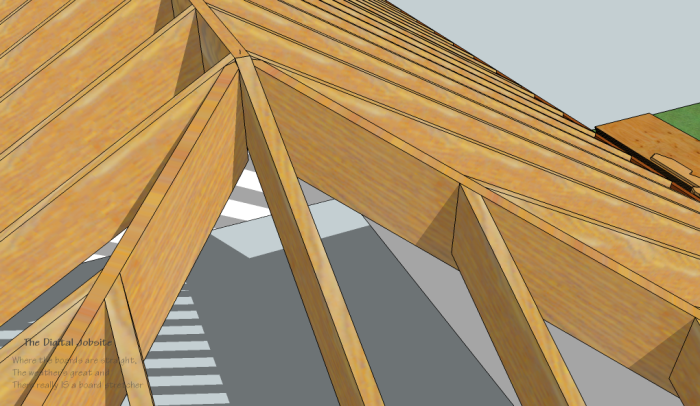
In this video I open up a hip roof framing model with a 7:12 pitch and peel back some Layers to reveal a perfectly cut, fit and installed hip rafter with its related hip jack rafters. Then, using a few digital “tools”, we will explore hip rafter geometry in general and reasons “dropping the hip” is necessary. By whipping up a simple roof plane overlay I’ll show how the roof planes intersect and reveal how the hip and jack rafters are used to achieve flat intersecting roof planes.
Are You Hip, Jack?
The most glaring contrast between the various pieces in the SketchUp model here at The Digital Jobsite and a real-world jobsite is between the perfectly straight, square and consistent nature of the modeled rafters compared to the variable nature of jobsite materials and conditions. Variables like inconsistent width and thickness of lumber and out of level/ out of square wall conditions, however minor, need to be taken into account to apply exact calculated dimensions and achieve acceptable results. Nevertheless, accurate calculations are always the best starting point and serve as a guide for minor adjustments and allowances required to complete a project. I hope this Model and Measure Method helps de-mystify this aspect of carpentry for you.
Model & Measure Part Two and Part Three:
The Model & Measure series continues in two further parts:
In Model & Measure Part Two: Hip Rafters De-mystified by Modeling in SketchUp I’ll cover the steps I developed to model the hip rafter its jack rafters for the model used in Part One. BTW, if you download the model with the link above and drill down with the Entity Info function you’ll see there are 260 entities in just one set of jack rafters! This means there is a total of 2,080 individual lines and faces for just the 8 sets of jack rafters. Although that is an intimidating number I think you’ll be encouraged by how quick it is to model such complex components with the power of SketchUp’s tools.
Model and Measure Part Three: Hip Rafters De-mystified by Measuring in SketchUp where I cover getting and applying layout dimensions for both hip and jack rafters, will be the meat of this series. It will (should?) bring together the whole picture so viewers will:
- Understand hip framing geometry,
- Have the capability to efficiently model all hip framing components,
- Gather all necessary dimensions and
- Apply them with confidence
to accurately layout and cut a complete hip roof of any slope and size.

View Comments
these are very helpful
syco,
I'm glad to know you find these helpful.
In producing the videos and related blog post I try to cover a topic, as I see it, completely, but it would be easy for me to miss something that might be important to viewers. So let me know if you have any questions about this hip roof framing series or any other topics covered at The Digital Jobsite.
Thanks for watching and commenting.
Matt Jackson
fm3b http://lenkmatten24.de/new/matten-chanel57.html Seiko 逆輸入 レディース http://www.atlatus.de/joomla/pradaoutletsale423.html 7yve89h 5fk http://www.bombus.de/img/katespade-online-8.html Prada 財布 新作 レディース http://www.pension-graz.at/images/katespade-at-222.html Prada 長財布 2wayショルダーバッグ http://www.atlatus.de/joomla/pradaoutletsale507.html 4pu http://drachen-bestellen.de/c4/bestchanel32.html Prada 長財布 芸能人