previous
  • Top 10 Videos of 2011
    Top 10 Videos of 2011
  • The Inspector Game: Goofs on a Roof
    The Inspector Game: Goofs on a Roof
  • An Introduction to Thermal Imaging
    An Introduction to Thermal Imaging
  • 10 Basement-Remodeling Tips and Techniques
    10 Basement-Remodeling Tips and Techniques
  • Replacing a Roof : Installing a Ridge Vent
    Replacing a Roof : Installing a Ridge Vent
  • Roofing articles, videos, tools, and materials
    Roofing articles, videos, tools, and materials
  • How to Avoid Complicated Fractions
    How to Avoid Complicated Fractions
  • Seven Steps to Choosing the Perfect Circular Saw
    Seven Steps to Choosing the Perfect Circular Saw
  • 7 Small Bathroom Layouts
    7 Small Bathroom Layouts
  • Buyer's Guide to Insulation
    Buyer's Guide to Insulation
  • Fine Homebuilding: The Digital Issues
    Fine Homebuilding: The Digital Issues
  • Your Guide to Energy Smart Homes
    Your Guide to Energy Smart Homes
  • 7 Solutions for Kitchen Layout and Design
    7 Solutions for Kitchen Layout and Design
  • Tool Test Preview: Compact Compressors
    Tool Test Preview: Compact Compressors
  • VIDEO: Stop Paint from Bleeding
    VIDEO: Stop Paint from Bleeding
next
60276 Multiscanner i700 OneStep Stud Finder

Zircon - 60276 Multiscanner i700 OneStep Stud Finder

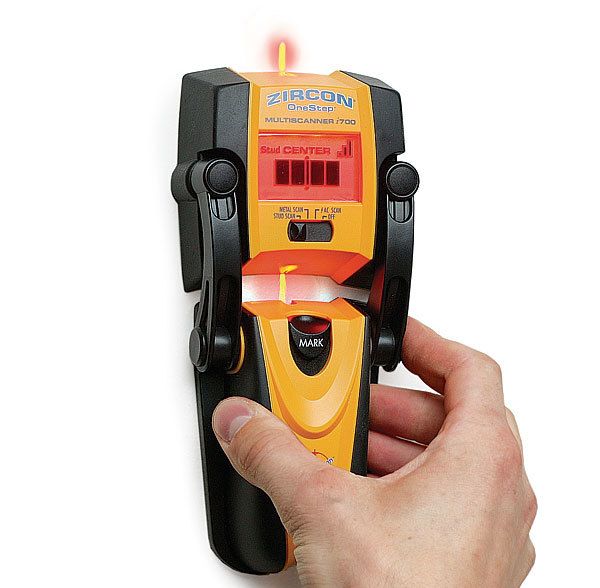
This stud finder from Zircon displays a series of bars that depict the exact position of a stud
$75.00 (As of 1/1/2006)

(3 user reviews) Write a Review

View all photos
Overview

Editor's Review: A Stud Finder That Actually Finds Studs

review date: January 1, 2006

Because I was in a hurry, I removed the brand-new i700 stud finder from its protective case, installed the 9v battery, and began using it. In less than 15 minutes, I had marked about 90 percent of the studs for a cabinet installation I was working on. I don't recommend not reading the directions for your new tools, but I mention my experience because the i700's display panel is so intuitive that getting accurate results is a no-brainer.

After switching the i700 to "stud scan" metal scan and AC (alternating current) scan also are options just place the stud finder on the wallboard. A bright orange display panel and a short tone signal that calibration is complete and that the i700 is ready to go. The i700 doesn't just beep or light up when it senses something behind the wallboard. It displays a series of bars that depict the exact position of the stud so that you can be sure to hit the center every time. Once you've found the center, just push a button that reads "mark" and a lead stylus puts a line on the wallboard. You don't even need a pencil.

I had some trouble finding wooden studs behind a plaster wall, but I used the equally accurate metal-scan feature to find the lath fasteners instead. I didn't have much luck with the AC scan, but this tool's main job is finding studs, something it does very well.
Editor Test Results:

Overall Rating N/A

Manufacturer Specifications

Manufacturer Zircon
Manufacturer's Web Site www.zircon.com
Manufacturer's Phone Number 408-963-4550
Weight 7.4 oz. (w/battery)
Dimensions 7.6 in. by 3.6 in. by 1.7 in.