Don’t be intimidated by 3D Drafting
Welcome! If this is your first experience on a “digital jobsite”, it may take some getting used to. Like (some) real world jobsites, this digital jobsite can be fascinating, motivating, confusing, and intimidating all at the same time.
If you go to sketchup.google.com and download the free version of Google SketchUp 7 you will get all the digital tools you need to go into business creating 3D models.
Build your own 2x4s
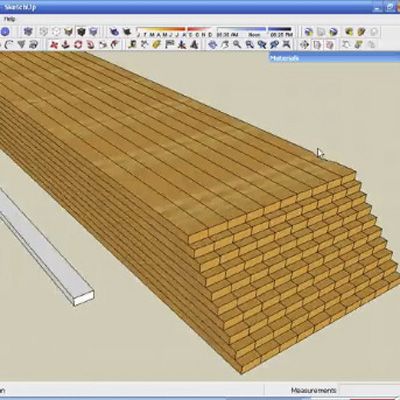
Check out what some of your new digital tools can do in this short screen capture video where I use the line tool and the push/pull tool (aka digital board stretcher) along with the move tool (aka digital grunt) and others to create a stack of 100 2x4x12′ lumber without even breaking a sweat! Compare this to moving a bunk of lumber on a real-world jobsite where it just rained last night and it’s a mud hole…
Is that great or what? No problem getting that handled before break time… now where’s the donuts?
Start with some free lessons
To get an idea of how to work with all the stuff in your new digital toolbox as shown in the video, spend some time with the tutorials link in the sidebar and Aidan Chopra’s SketchUp tutorials on YouTube, starting with simple ones that cover push/pull, grouping, moving and copying which were used to create the bunk of 2×4’s you just saw. If you have a work or home project in mind like a garden trellis, new deck or maybe a child’s playhouse, break out some of the digital tools and just start drawing. There’s nothing to lose creating a project on the Digital Jobsite where the digital dumpster (“Delete key”) is only a click away.
SketchUp is a very intuitive program to learn, and this short intro should help make the Digital Jobsite more interesting and less intimidating and confusing, to the point where you can see when and how it can improve the design/planning part of your work.
Using SketchUp in the real world
This blog isn’t intended to be a tutorial on the computer part of learning how to operate the SketchUp software as much as a forum to share unique applications of a great free program to improve the work of Fine Homebuilders. I hope the time you spend here is as rewarding to you as adapting this digital toolbox to my business has been to me.
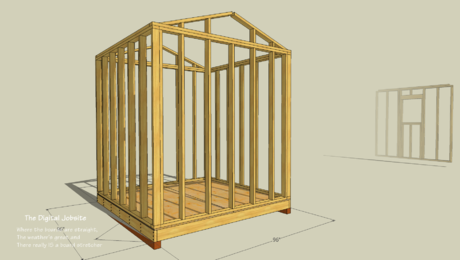
The next project I’ll cover will be creating components to build a 3D model of basic wall framing. Until then, if someone can help me come up with some new digital excuses, as it occurs to me that “I clicked it twice and its still too short” isn’t going to get me anywhere on the Digital Jobsite.
Later,
Matt
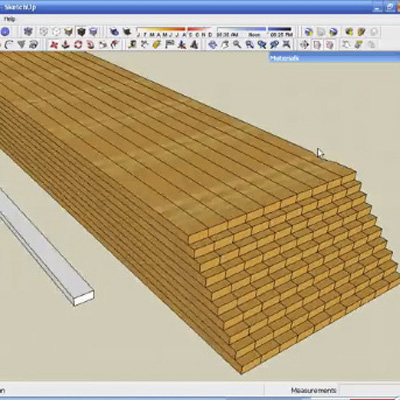
Make a truckload of 2x4s with a few clicks of your mouse.














View Comments
I've just added a floor to my house and built a bridge as the main entry to the house. The sketched the entire house and landscape in SketchUp.
Every detail of the house interior that could not be shown in simple 2D architectural format was drawn in SketchUp and given to the contractor.
The kitchen island went through hundreds of iterations and we held two "final" meetings with the cabinet maker in front of the computer so we could have a "meeting of the minds" more easily.
A wonderful tool.
I have been using Sketch-up since version 3.0 and it is a fantastic tool. The pro version with plugins (Podium being one) can produce almost photo realistic renderings.
It should take no more than a half day to learn the basics. There are a couple of books on how to use Sketch-up.
Sketch-up for Dummies and Google Sketch-up & Sketchup Pro 7 are available from Amazon.
Last point is how much fun this program is to use. Everyone I have turned the program on to loves it.
"The kitchen island went through hundreds of iterations"
Oy! As a CKD, the idea of this makes my head hurt!
I too have used SU for years, though mostly for furniture design. I have the Pro version and find the Layout tool a really good way of going from 3D models I can work with to 2D plans most contractors are comfortable with.
I've recently designed my own house using SU & LO and if you're really stuck for something sensible to do with your spare time you might find my build related web pages & blog amusing. http://www.rowledge.org/tim/building/building/blog.html
SketchUp is exactly what a person who has a hard time picturing things in 3 dimensions from 2 dimensional drawings needs to evaluate the desirabilty of numerous design decisions.
I've continued to learn more about what's "under the hood" with SU as I've modified my personal house plans over the last year.
Now, for a touch screen version that works on the iPad . . .
Has anybody here seen Blender? (Blender.org)
As they say "Blender is the free open source 3D content creation suite, available for all major operating systems under the GNU General Public License."
In that respect its similar to Open Office.org
Its geared more towards pro artists and animators, but the architectural stuff that I have seen done with it has been quite good looking.
I just returned from Breaktime where you can no longer post an skp file in their new format. Once upon a time, I learned to frame hip and valley roofs, cut the roof sheathing including both the mitre and bevel, because skp files were allowed. I don't know what's going on over there any more. You know how they say "a picture is worth 1000 words" ... well, now you'll have to teach yourself articulation if you wish to explain what difficulty you may be having trying to articulate the problem!
I found the feeds to be easily understood. And it's nice to see SketchUp at Fine Home Building. It belongs here in a forum where ideas can be exchanged through the use of skp files that anyone can use and take a measure from.
The uses of SketchUp will be as many and varied as the people using the forum, so here is a suggestion:
When members or readers of your forum wish to post a comment, allow the attachment of skp files.
Of course, as soon as do that, you'll need to increase the staff numbers to handle the onslot and popularity of the blog.